What’s does ‘My Pension’ provide?

'My Pension' provides:

  • Simple registration and login – no need to remember usernames and security questions, just login with your email address and password.
  • Modern look and design – making the site easier to understand and move around.
  • Online annual benefit statements – broken down into chunks to help you understand what pension benefits you have. And from 2026 you can now view a 5-minute personalised video which summarises your pension benefits in a simplified way.
  • Retirement planning tool - this will allow you to set retirement goals and identify whether you are on track to reach them.
  • Benefit calculators - you can see an estimate of your benefits if you leave the Scheme or wish to consider voluntary retirement
  • Contact request - If you need help with anything, you can submit a request online.  ‘My Pension’ also provides the ability to update personal details, nominations for death grants and more.

Need support?

If you have anything further you would like to know, please see the ''My Pension' questions answered' section below.

However, if you still need support, call 0300 200 1027 or email [email protected].

How to register

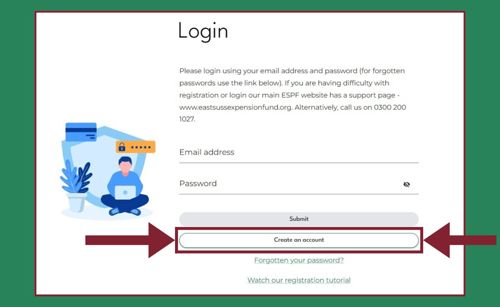
If you’ve never signed up before you need to ‘create an account’*.

You can do this by following the link above or by going to the 'login page' and clicking the 'create an account' link (see below).

If you have any problems, please call us on 0300 200 1027.

New Create an account  image


Logging in to 'My Pension'

If you have already registered for an account please log on by following the below link:

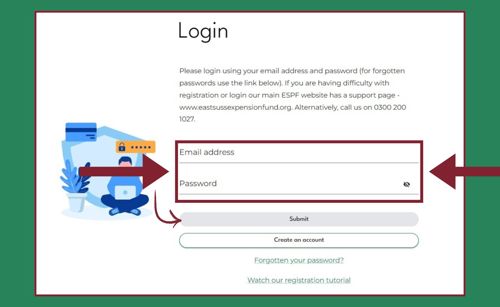
Once you have entered your email address and password you will be asked to click submit (see image below).

Login page image

We suggest saving 'My Pension' as a favourite.

Please do not try and create a new account if you have forgotten your sign in details. 

For password resets, see article below.

If you need support, please call 0300 200 1027.

Forgotten your password?

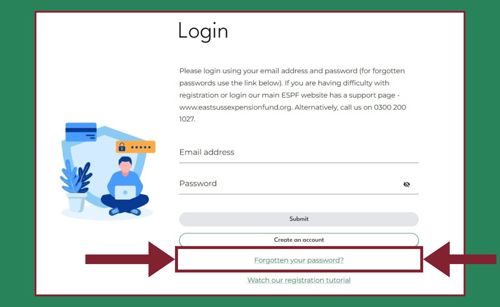
If you have registered for 'My Pension' but have forgotten your password simply click on:

New Forgotten Password image

 You will need your:

  • Surname
  • Date of birth
  • National Insurance Number

Please ensure both the 'Email address' and 'Password' fields are blank.

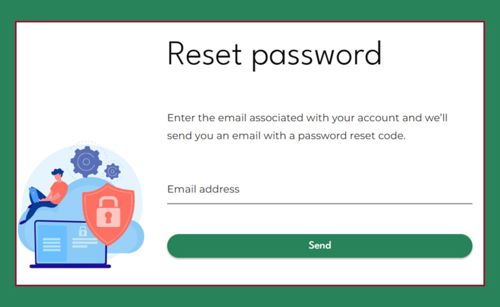
You will then be directed to the 'Reset password' website page (see image below). You will be asked to enter the email address associated with the account you wish to access. Please type that in and follow the on-screen instructions.

NEW reset password image


ANNOUNCEMENT

Deferred pension calculator - My Pension

The video below provides an overview of the deferred pension calculator available on 'My Pension'. This calculator allows members who have left the Scheme (but not yet taken benefits) to view estimated retirement figures.

How to use the deferred pension calculator

'My Pension' questions answered

These question and answers should help with any queries you have. However, if you still need our support please call us on 0300 200 1027.

Electronic Identity Verification (EIDV)

What is EIDV?

As part of registering for ‘My Pension’ we may need you to clarify your identity.

Electronic ID Verification allows members to confirm their identity by submitting a picture of their passport or driving licence alongside a live image of their face, which is taken by their phone camera.

How do I use the EIDV process?

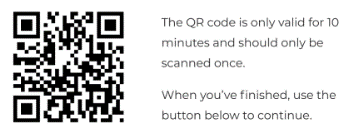
‘My Pension’ provides on-screen instructions that detail the steps you must take. If you are using a laptop to register, you will initially need to scan a QR code which will be sent to you via email (example below) using the camera on your mobile phone.

Example of QR code on the EIDV page

Once you have scanned the QR code and opened the link you will be asked to follow the on-screen instructions. Information is also given which details how we use the data provided and how to capture your identity document and a picture of your face correctly.

If you are registering directly via your mobile phone - rather than seeing a QR code - you will see a button which will allow you to complete the EIDV process via your phone.

Note: It may on occasions take a couple of attempts to capture the identity document and your face correctly. The system will tell you if you have not captured what’s required properly.

If you do not wish to use EIDV, you can instead request a letter in the post. This letter includes an activation code which you will need to complete the registration process.

Requesting a new activation code

Sometimes the Pension Fund will provide you with an 'activation code' which forms part of the registration process (or you can request one yourself). These codes expire after 30 days. If you need a new code, you can:

  1. Go to https://mypension.eastsussex.gov.uk/registration/
  2. Consent to use of your personal data on the 'create an account' screen
  3. Choose 'Let's Begin' follow the instructions and a new Activation Key will be sent to you

How do I use 'My Pension'?

Upon logging in, you will see your ‘My Pension’ homepage is categorised into different sections to make it easier to find the information you require.

You can click on the links underneath each image to navigate your way around the website.

Can I use 'My Pension' to update my personal details?

Go to the section called ‘Details and settings’. Select ‘Your personal details’ to check or update your home address, contact telephone numbers, login email address and password.

To update personal details such as your name or title, please contact us.

Can I let you know who I'd like to receive benefits on my death?

You can use ‘My Pension’ to tell us who you would like to receive any lump sum death grant that may be payable in the event of your death. Go to the section called ‘Manage Beneficiaries.’  Here you can create, add, or edit your nominee(s). It is important that you keep this information up to date with your wishes.

Can 'My Pension' show me how much my pension is currently worth?

You can use 'My Pension' to view the current estimated value of your pension at your normal pension age.

You will see the 'Latest Valuation' section on the homepage and within that section you will see the ‘Current Pension Value’ figure. This is the estimated pension payable at your normal pension age, based on benefits accrued to date.

You also have access to your annual benefit statements within the 'Annual Benefit Statements' section – see question below for further details.

Where can I find my Annual Benefit Statement and what does it show me?

You can access your annual benefit statements within the 'Annual Benefit Statements' section. This provides more detailed information on the pension benefits you hold.

From 2026, the Fund introduced a five-minute personalised video summarises your pension benefits in a simplified way. 

Benefit statements are issued each year to members of the Local Government Pension Scheme (LGPS). Your statement shows the value of your pension to the 31 March each year.

If you are an active member, you will also see an estimate of your pension’s worth if you continue to contribute up to your normal pension age, together with benefits payable on death. 

You can download or print a copy of your annual benefit statement if required.